
Managing your plan
Everything to do with your plan (upgrading, changing seats, switching intervals, downloading invoices, cancelling) is one flow that either starts in Settings or ends up in the LemonSqueezy customer portal. Say Less Office uses LemonSqueezy to handle payments, so anything that touches money happens through them.
How to upgrade from Free to Pro
Open Settings and go to Billing. The Pro card is on the right.
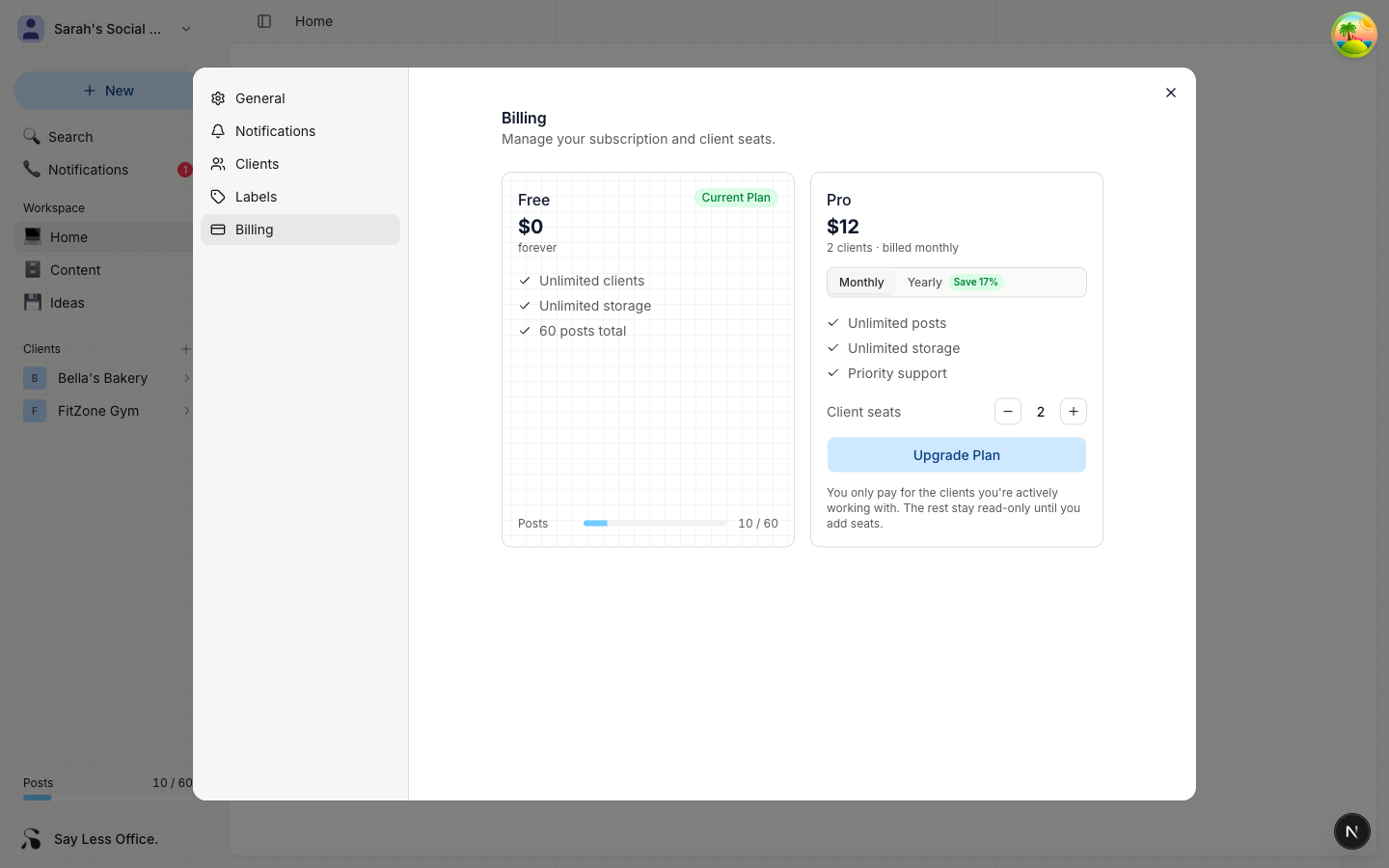
The price shown on the card updates as you adjust two things, so you'll see the exact total before you commit:
- Interval: pick Monthly or Yearly using the toggle above the feature list. Yearly is billed in one payment and comes out cheaper per month.
- Client seats: under the price, use the + and - buttons to choose how many clients you want active. Start with the number you're managing today - you can change this later from the customer portal without going through the whole upgrade again.
Once the number on the card looks right, click Upgrade Plan. Say Less Office hands you off to the LemonSqueezy checkout page with your seat count, interval, and total pre-filled. Enter your card details there and confirm the payment.
When the payment clears, you're redirected back to Say Less Office. Three things flip on:
- The Pro card gets the Current Plan badge.
- Any clients that were locked (if you had them on Free before) unlock.
- The 60-post lifetime cap disappears, so you can create posts again.
Where to change seats, invoices, or cancel after you've upgraded
Once you're on Pro, the top-right of the Billing section shows a Manage subscription button. Clicking it opens LemonSqueezy's customer portal in a new tab. That's where you handle everything after the first upgrade:
- Changing how many seats you're paying for
- Switching between monthly and yearly billing
- Downloading past invoices
- Cancelling your subscription
Cancelling happens in the customer portal too, not in Say Less Office directly. Your Pro features stay active until the end of the period you already paid for. After that, your workspace moves back to Free.
What happens when you go back to Free
The 60-post cap kicks in, so if you already have 60+ posts, you won't be able to create new ones until you upgrade again.
How to fix a failed payment
If a renewal payment doesn't go through, a red warning appears in the Billing section asking you to update your payment method. Click Manage subscription to fix the card in the customer portal. While the payment is retrying, you keep your seats. If the retries stop working, your workspace drops to Free.