Verifying your email address
Right after you signed up, Say Less Office sent a verification link to your email address. Clicking it is the one setup step that matters before you start working, because notification emails from Say Less Office (client approvals, revision requests, post comments) only reach your inbox once your email is verified.
Everything else in the app still works while you're unverified. You just won't get the emails.
Where do I find the link?
Look for a message in your inbox with the subject Verify your email. Click the button in it and you're done. The link stays valid for 24 hours.
I can't find the email - what now?
Check your spam folder first, then open your settings from the account menu in the top-left of the sidebar.
In the General section, scroll to Email address. If your email isn't verified, you'll see a small Verify your email to receive notifications banner above the field with a Resend email button on the right.
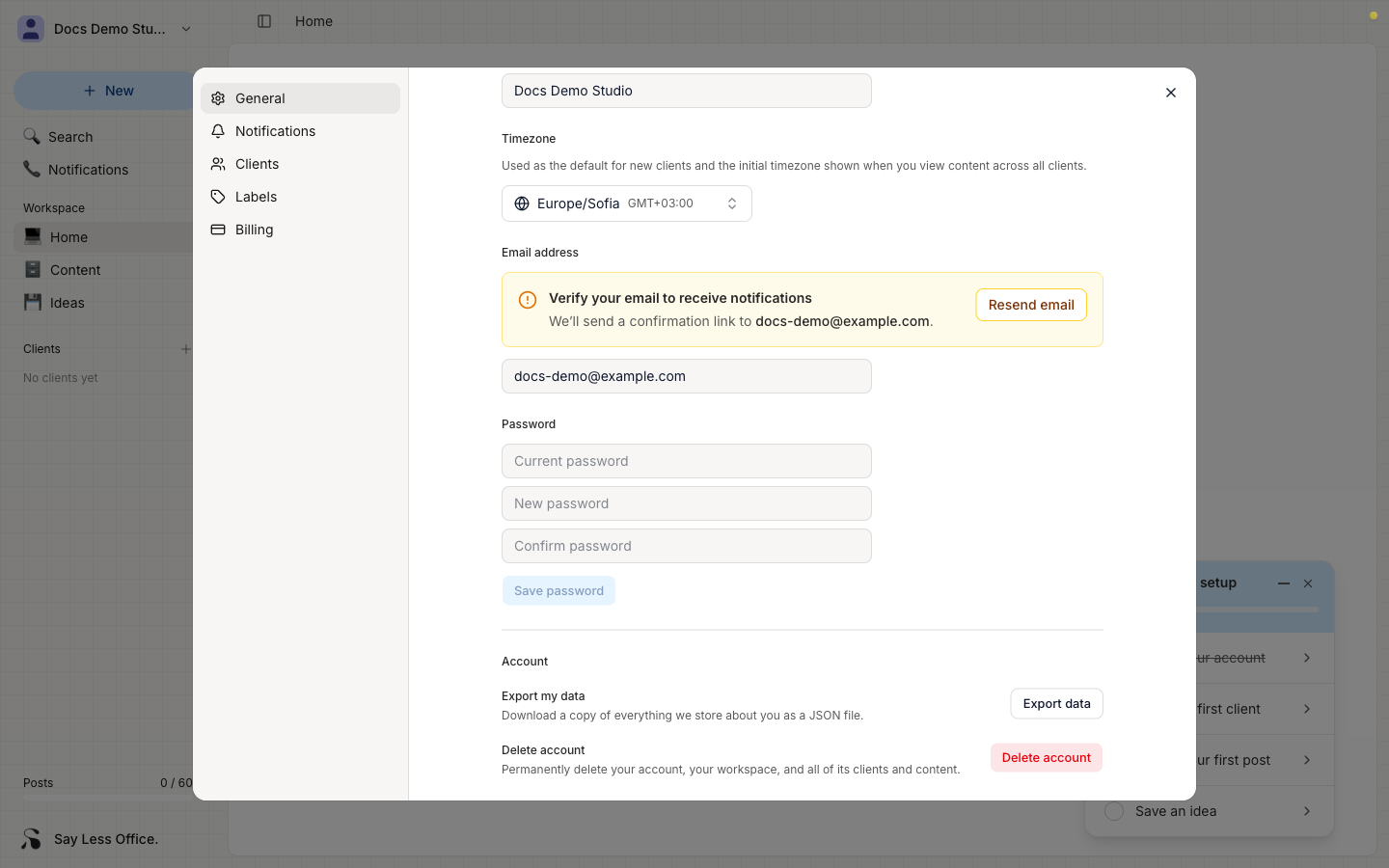
Click Resend email and a fresh link goes out. There's a 60-second cooldown before you can resend again.
What changes after I verify?
Once you click the verification link, the banner goes away and notification emails start delivering. That means:
- You'll get an email when a client approves a post.
- You'll get an email when a client requests changes on a post.
- You'll get an email when a client leaves a comment.
- The automatic reminders that chase your clients when a post has been sitting on approval also start working.