Managing your email notifications
Say Less Office notifies you about three things by email when they happen on any of your clients' posts: a revision request, an approval, and a client comment. You can turn each one on or off individually.
Where to find your notification settings
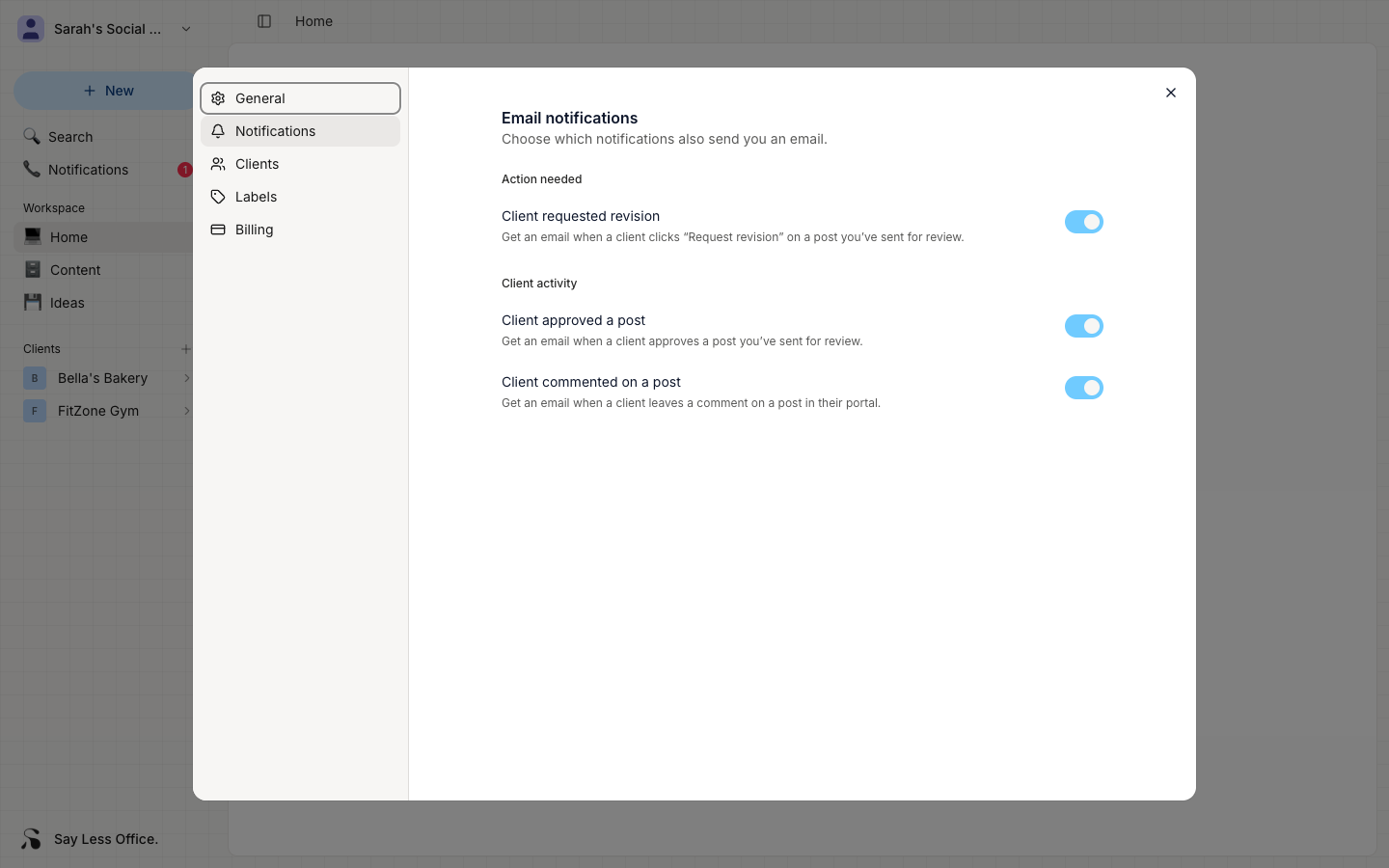
Open Settings from the account menu in the top-left of the sidebar, then click the Notifications tab in the modal's side navigation.
What each notification email is for
- Client requested revision - a client sent a post back for a rewrite. Sent as soon as they submit the revision.
- Client approved a post - a client marked one of your posts approved.
- Client commented on a post - a client left a comment on a specific post.
Flip the switch to change the setting; it saves right away.
What to check if you're not getting the emails
Two common reasons an email doesn't arrive even when the toggle is on:
- Your email address isn't verified. See Verifying your email address.
- The email landed in spam. Add
hello@saylessoffice.comto your contacts so future notifications don't get filtered.